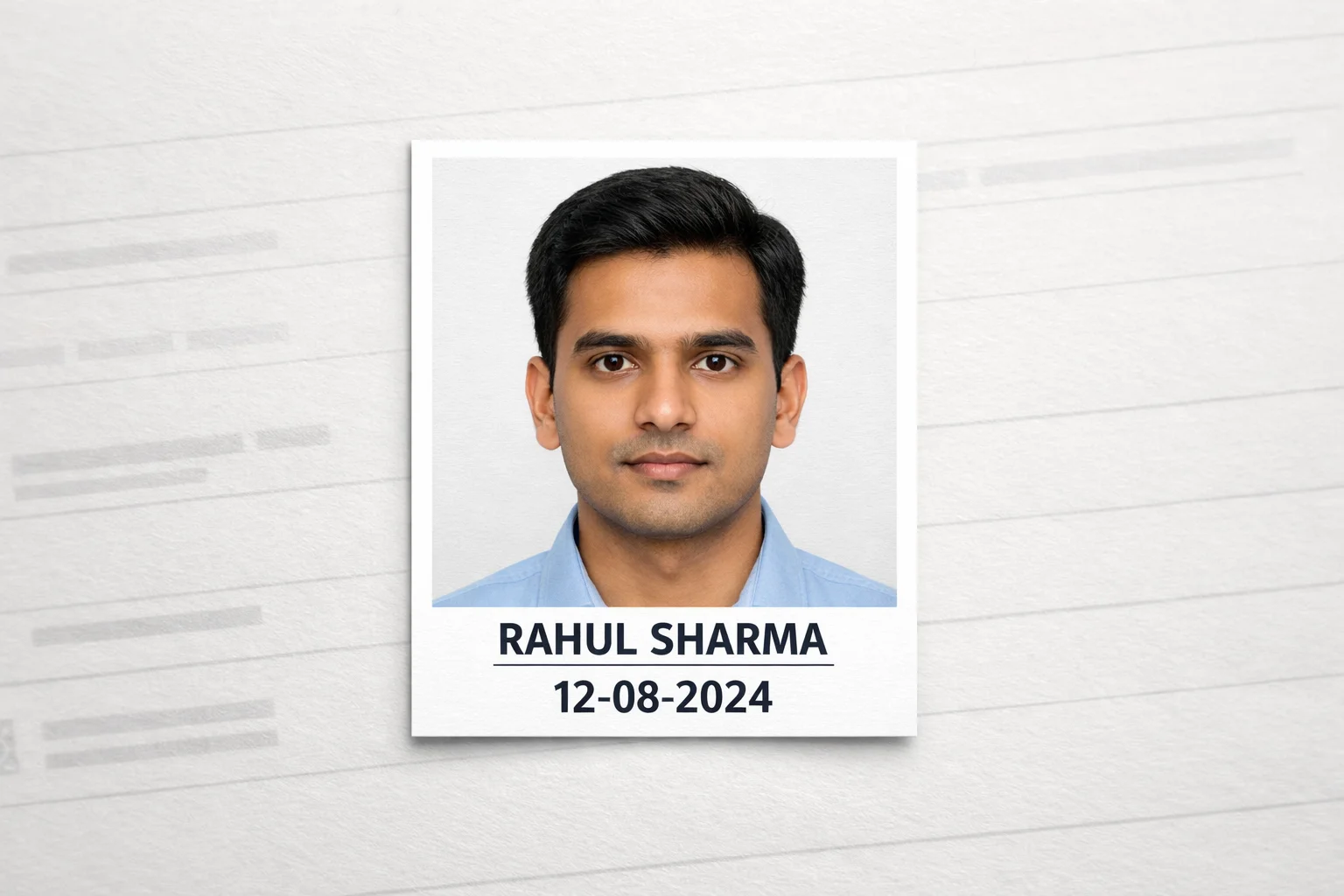
Every year, lakhs of Indian students face application rejection for SSC, NEET, RRB, and other government exams simply because their passport photo doesn't have the name and date properly added. Our free tool lets you add name and date on passport size photo online in seconds — with automatic resizing, perfect formatting, and zero technical skills required.
Upload Your Passport Photo
JPG, PNG, WEBP — Max 15MB
Enter Photo Details
✓ 100% Secure • Processed in Browser • Never Uploaded
Your formatted passport photo with name & date will appear here
How to Add Name and Date on Passport Size Photo — Official Guidelines
Critical Requirement: When exam notifications specify "passport size photo with name and date," they require digitally inserted text — NOT handwritten text on a printed photo. Our tool ensures perfect compliance by adding crisp, clear text that meets all portal validation standards.
Step-by-Step GuideHow to Add Name and Date on Passport Photo Online — 4 Simple Steps
Upload Your Photo
Click "Choose Photo" or drag & drop your passport size image. We accept JPG, PNG, and WEBP formats up to 15MB. Your photo is processed locally — never uploaded to any server.
Enter Name & Date
Type your full name exactly as it appears in your application (will auto-convert to CAPITALS). Select the date when the photo was taken using the date picker.
Select Exam & File Size
Choose your exam preset (SSC/NEET/RRB/Defence — verify notice) or select custom size. Pick target file size: 20KB for UPSC, 50KB for SSC/RRB, 100KB for NEET/JEE.
Generate & Download
Click "Generate Photo with Name & Date". The tool adds text at bottom margin, resizes to exact KB, and prepares your exam-ready photo. Download instantly with one click.
Passport Photo Name & Date Requirements by Exam
| Exam | Photo Size | File Size | Text Format | Special Rules |
|---|---|---|---|---|
| SSC — only when current notice asks | Notice-specific (413×531 px working canvas) |
Notice-specific | CAPS DD-MM-YYYY |
White background Face 70-80% |
| NEET UG/PG | Notice-specific (413×531 px working canvas) |
100 KB | CAPS DD-MM-YYYY |
Recent photo No spectacles |
| RRB — verify notice | Notice-specific (413×531 px working canvas) |
Notice-specific | CAPS DD-MM-YYYY |
Portrait only No cap/sunglasses |
| Defence — verify notice | Notice-specific (413×531 px working canvas) |
Notice-specific | CAPS DD-MM-YYYY |
Strict white bg Military standards |
| UPSC CSE | Notice-specific (413×531 px working canvas) |
20-40 KB | CAPS DD-MM-YYYY |
Very strict size High compression |
| JEE Main | Notice-specific (413×531 px working canvas) |
100 KB | CAPS DD-MM-YYYY |
Light background Clear face |
- Handwritten name/date on printed photo (must be digital)
- Text in lowercase or mixed case (must be ALL CAPS)
- Wrong date format: 15/03/2026 instead of 15-03-2026
- Text covering face or eyes
- File size exceeds limit (e.g., 151 KB when max is 150 KB)
- Using landscape orientation for portrait-required exams
- Adding text with mobile apps that compress poorly
- Name format doesn't match application form
- Dimensions: Exactly 3.5cm × 4.5cm (240×320 px)
- File size: Within exam limit (20/50/100 KB)
- Name + DOP in CAPITALS, black color
- Date format: DD-MM-YYYY with hyphens
- Text at bottom margin, not covering face
- White/light background, face 70-80% visible
- Photo taken within last 3 months
- No glasses, cap, shadows, or filters
Complete Guide: Add Name and Date on Passport Size Photo Online Free
Every year, lakhs of Indian students preparing for SSC CGL, NEET, RRB, Defence — verify notice, UPSC, and other government examinations face unexpected application rejections. The most common culprit? A seemingly minor detail: the passport size photo lacking the mandatory name and date of photo (DOP) printed in the correct digital format.
When exam notifications specify "passport size photo with name and date," they mean a digitally compliant image where your full name and the photo date are permanently embedded at the bottom of the frame in capital letters. This isn't about printing a photo and writing on it with a pen — that approach leads to blurry text, inconsistent formatting, and instant portal rejection. Instead, candidates need a reliable, free way to add name and date on passport size photo online while simultaneously meeting strict dimension and file size requirements.
Why Manual Methods Fail: The Need for Automated Tools
Many candidates attempt to insert name and date in photo online using generic mobile apps or desktop software like Photoshop. These tools often fail because they don't understand exam-specific rules. For instance, a generic app might add text in lowercase, use the wrong date separator (/ instead of -), or compress the image beyond the allowed KB limit. The result? An SSC portal rejection or RRB application disqualification.
Our advanced passport size photo name and date editor solves this by offering exam-specific presets. Select "SSC CGL" and the tool auto-applies: 240×320 px dimensions, 50 KB target size, CAPITAL LETTERS text format, and DD-MM-YYYY date structure. This precision is what separates a compliant photo from a rejected application.
Resize Photo to 50KB and Add Name Date in One Step
One of the most searched queries is "resize photo to 50kb and add name date". Candidates often have a high-quality photo that's 2-3 MB in size. They need to both compress it to the exact KB limit AND add the mandatory text overlay. Doing these steps separately in different tools introduces errors and quality loss.
Our integrated tool handles both operations simultaneously. When you select "50 KB" as your target size, the compression algorithm preserves facial clarity while reducing file weight. The text overlay is added at the optimal DPI to remain sharp after compression. This is the essence of a true photo date and name maker without photoshop — professional results without professional software or technical skills.
Write Name and Date on Photo Online Free — No Registration Required
Unlike many online tools that require email registration, payment details, or force watermarks on free users, our platform is genuinely free. You can write name and date on photo online free without any hidden charges. The tool works entirely in your browser using client-side JavaScript, meaning your photo never leaves your device. This ensures complete privacy and security while eliminating upload/download delays.
Put Name and Date on Photo Online from Mobile or Desktop
With most candidates applying via smartphones, our put name and date on photo online tool is fully responsive. Upload a photo from your mobile gallery, enter text details using the on-screen keyboard, and download the compliant image — all within your mobile browser. No app installation, no account creation, no watermarks. This accessibility makes it the preferred choice for students in remote areas with limited desktop access.
Add DOP (Date of Photo) to Image — Format Matters
The date format is critical. Most Indian government exams require DD-MM-YYYY format with hyphens (e.g., 15-03-2026), NOT slashes (15/03/2026) or dots (15.03.2026). Our tool automatically formats the date correctly based on your selection, eliminating this common error. The add dop date of photo to image feature ensures consistency across all your application documents.
SSC Photo with Name and Date Maker Online — Exam-Specific Optimization
SSC CGL, CHSL, MTS, and CPO exams have strict photo requirements. Our ssc photo with name and date maker online preset ensures: exact 50 KB file size, 240×320 pixel dimensions, black text in bold capitals, and proper bottom margin spacing. This eliminates guesswork and ensures your SSC application passes the initial document screening.
NEET Photo with Name and Date Generator — NTA Compliance
NEET UG and PG applications through NTA require 100 KB photos with name and DOP. Our neet photo with name and date generator handles the higher file size limit while maintaining NTA's strict quality standards. The tool ensures your photo meets both the technical specifications and the visual clarity required for admit card printing.
RRB Photo with Date and Name Editor — Railway Exam Ready
Railway Recruitment Board exams (ALP, NTPC, Group D) require portrait orientation photos with name and date. Our rrb photo with date and name editor ensures you don't accidentally use landscape format (which is only for Group D in some cases). The tool auto-corrects orientation and applies railway-specific formatting rules.
Convert Photo to 20KB with Name and Date Online — UPSC & State PSC
UPSC Civil Services and various State PSC exams have the strictest file size limit: 20-40 KB. Our tool can convert photo to 20kb with name and date online while maintaining readability. The advanced compression algorithm reduces file size without making the text illegible or the face unrecognizable — a common problem with basic compression tools.
Auto Add Name and Date to Passport Photo — Smart Automation
Our auto add name and date to passport photo feature intelligently positions text at the optimal location: bottom margin, centered, with adequate spacing from the face. The tool automatically converts lowercase input to CAPITALS, formats the date correctly, and adjusts font size based on photo dimensions. This automation eliminates human error and ensures consistency.
Add Text to Passport Size Photo Online — Custom Positioning
For exams with unique requirements, our add text to passport size photo online feature allows custom positioning. While most exams require bottom-center text, some state-level exams may have different specifications. The Custom Exam tab gives you full control over text placement, font size, and formatting.
Custom Text on Passport Size Photo Online — Beyond Name & Date
Some applications require additional text beyond name and DOP — such as category (SC/ST/OBC/General), post applied for, or application number. Our custom text on passport size photo online option lets you add multiple lines of text while maintaining compliance with size and clarity requirements.
Passport Size Photo 3.5cm x 4.5cm with Name and Date — Standard Dimensions
The universal standard for Indian government exams is passport size photo 3.5cm x 4.5cm with name and date, which translates to 240×320 pixels in digital format. Our tool maintains this aspect ratio perfectly, ensuring your photo displays correctly on admit cards, identity cards, and official documents without distortion.
Add Name and Date on Passport Photo 50KB — Perfect Balance
The 50 KB file size is the sweet spot for most exams (SSC, RRB, Defence — verify notice). It's large enough to maintain photo quality and text clarity, but small enough for quick portal uploads and storage. Our tool's add name and date on passport photo 50kb feature uses intelligent compression to hit this target exactly, not approximately.
DOP Text Generator for Passport Photo — Date Validation
Our dop text generator for passport photo includes date validation to prevent impossible dates (like 31-02-2026) or future dates. The tool also warns if the photo date is older than 6 months, helping you avoid rejection for using outdated photos.
Add Name and Date String to Image Metadata — Advanced Feature
For tech-savvy users, our tool can add name and date string to image metadata (EXIF data) in addition to the visible text overlay. While most exam portals only validate visible text, having metadata can be useful for personal record-keeping or future applications that require embedded information.
Photo Date and Name Maker Without Photoshop — Free Alternative
You don't need expensive software like Adobe Photoshop to create compliant photos. Our photo date and name maker without photoshop provides all the essential features: text overlay, resizing, compression, and format conversion — completely free and accessible from any device with a web browser.
Passport Photo with Name and Date for Govt Job — Universal Compliance
Whether you're applying for central government jobs (SSC, RRB, UPSC), state government positions (State PSCs), defense services (Defence — verify notice), or professional courses (NEET, JEE), our passport photo with name and date for govt job tool ensures universal compliance. Select your exam type, and the tool applies the correct specifications automatically.
Frequently Asked Questions
Everything you need to know about adding name and date to passport photos for government exams.
Ready to Submit a Perfect Application?
Don't let photo formatting errors cost you months of preparation. Generate your compliant passport photo with name and date in seconds — 100% free, no registration required.